Now Elementor Pro is known as the number-one pick for web developers or designers. The interface of Elementor Pro is one of its biggest attractions. The layout is so easy to understand, that beginners also can find interesting content. It makes it easier to organize awesome web pages with drag-and-drop attitude. With these, you can make beautiful websites without knowing how to do any coding. But the fact that we are still talking about Elementor Pro, at a time when there is no shortage of WordPress page builders on the market, is all you need to know.
Elementor Pro Features
- Drag and Drop Editor
- Live Design & Inline Editing
- Mobile editing in real-time
- Default Elementor widgets
- Default Elementor templates
Technical Information
Core Features
Elementor Pro is a popular WordPress plugin which offers a drag-and-drop editor, live design and inline editing, mobile editing, and a wide selection of widgets and templates.
System Requirements
For best performance, it is recommended that Elementor Pro be run on a WordPress website with a modern version of PHP (a minimum of PHP 7.0 and preferably PHP 7.4+), and MySQL 5.6 or higher. It is likewise highly optimized & compatible with WordPress 5.0+.
Compatibility
Elementor Pro works faster with any existing theme/plugin you are already using on your website. I use the Hello Elementor theme, Because it’s the best theme for Elementor page builder, when I update my website, nothing is broken.
Use Cases Of Elementor Pro
Business Websites
Elementor Pro works great in creating business websites in an advanced way with a fully customized look to match a company’s brand identity. If you want to design your website with an eye-catching look, then you have to use Elementor Pro widgets.
E-commerce
With its WooCommerce Builder, Elementor Pro makes it convenient to design custom product pages, product category pages, products filterable, product search, cart pages, checkout pages, and thank you pages. Elementor Pro: “Nothing is impossible on your web page.”
Portfolios and Personal Blogs
For creatives and bloggers who want to build a personal brand, Elementor Pro offers you the resources you need to make stunning portfolios and blogs that stand out.
Landing Pages
Elementor Pro simplifies the process of building high-conversion landing pages that are crucial for efficient marketing campaigns and lead generation.
Benefits Of Using Elementor Pro Plugin
Easy-to-Use All-in-one Solution
There are so many themes and plugins available in the Envato marketplace, and in the Envato marketplace, all are premium themes, If you want to use a free theme, then you can use OceanWP theme and Astra theme. These themes are best compatible with the Elementor plugin. Features include dragging the needed module to the marketing email space to build emails quickly. Update email templates with this all-in-one visual builder instead of writing HTML code. Import images, content, and elements into the template from different sources.
Fully Customizable Email Layout
Elementor Pro gives you total customization freedom, including custom CSS, motion effects, one of the most powerful global widgets (not available with any other page builder!) to date, and the ability to create limited editions or even more robust renderings.
Elementor Pro Performance Optimization
Elementor Pro compounds website creation, making life easier with features like lazy loading and asset optimization that keep your website from lagging.
Regular Updates and Support
Regular updates with new features and improvements, plus premium support for problem diagnosis and other inquiries.
Challenges and Limitations
However, nothing is perfect, so here is a short list of challenges you might face when using Elementor Pro.
Learning Curve
If you know widgets, then it’s very easy to use. Just read the documentation and work on your web pages. It is easy to use Elementor Pro, there is a learning curve for beginners especially if you are new to web design concepts and terminologies. Elementor has its own YouTube channel also, where it publishes videos, about how widgets work, and how to design your website using free and pro widgets.
Potential Conflicts
Issues with some WordPress themes and plugins can always come up, but things can be resolved, hence updates and community putting together to solve those problems.
Cost
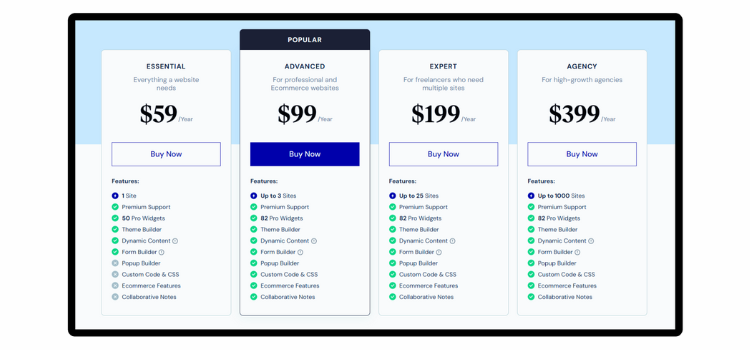
Elementor Pro is a premium product and, while it does offer a lot, it can be expensive for smaller businesses or those who have less to spend. Below, I provide a screenshot of the pricing table, or you can also click my affiliate link to see the pricing packages.
New Features Of Elementor Pro
Theme Builder
In the Theme Builder, users can create and modify all parts of their website, including headers, footers, body, and dynamic content templates.
WooCommerce Builder
Once upon a time, woo-commerce was not supported by Elementor page builder, But Now Elementor makes it easy to design any kind of e-commerce website. What do you need under your e-commerce website? Everything will find only one-page builder, which is the Elementor Pro page builder plugin.
Advanced Motion Effects
Elementor Pro Design Websites with Advanced Motion Effects – scrolling animations and mouse effects, to include an additional design layer to the web.
Popup Builder
Another versatile module featured in Wasabi is Popup Builder, which enables users to create popups for any purpose—leads, announcements, promotions, you name it.
Comparative Analysis
Elementor Pro vs. Free Elementor
The free plan is designed for basic design, while Elementor Pro offers advanced features like the Theme Builder, Popup Builder, and more widgets.
Elementor Pro vs. Other Page Builders
How does Elementor Pro compare to other page builders like Beaver Builder and Divi in terms of price, features, and performance?
Troubleshooting Common Issues
A guide to resolving common issues that users might encounter, such as plugin conflicts and performance optimization.
Conclusion
So, there you have it! Elementor Pro is like a magical toolbox full of amazing tools that make building beautiful websites a breeze. It’s easy, fun, and powerful, making it the perfect choice for anyone who wants a fantastic website. Give it a try, and let your creativity shine!
Summary and Call to Action
Elementor Pro is the ultimate page builder that combines ease of use with powerful features. Whether you’re a beginner or a pro, you’ll love how it makes website building fun and simple. Ready to create your dream website? Start using Elementor Pro today and watch your ideas come to life!
Elementor Pro FAQs
Elementor is very popular because of its ease of use, user-friendly admin panel, controlled setting elements, and many other features. Thanks to the drag-and-drop system, even those with no prior coding knowledge can create stunning websites in no time at all. Moreover, Elementor has an enormous catalog of layout templates and widgets, which provides a lot of customization for various design requirements. It is made to work with most WordPress themes, making it very powerful and versatile. Many website designers and developers prefer to use this plugin because of its versatility.
Elementor Pro allows you to access a wide range of tools that help to improve the design of your website. Elementor Pro also provides compatibility with a number of other plugins and third-party tools to help leverage more advanced features such as pop-ups, forms, and custom animations. Custom headers, footers, and theme builder functionality also add more control to the design and user experience across the site.
Well, Elementor Pro is built with SEO in mind, and it comes with a host of features that support the best SEO functionalities. It is compatible with top SEO plugins (Yoast SEO and Rank Math), so you can easily control the on-page SEO aspects like meta tags, headings, and alt texts. Now, obviously, Elementor Pro is built around good SEO standards.
This speaks to your specific building and management needs when using WordPress, so whether Elementor Pro is “enough” really is a moving target. Elementor Pro comes with a plethora of pre-designed templates, widgets, and design elements that make it easy to build beautiful, professional-looking websites without any coding.
Elementor is a flexible page builder that offers a variety of customization options. Design, layout, animations, dynamic content, and custom CSS—users can tweak every corner of their site. Along with this, the plugin extends itself to other tools and plugins, broadening its utility. It has a solid API for developers, which means they can extend what can be done with Elementor even further.